Mouse is Dead
The hardware for spatial computing already shipped. The reason nobody uses it isn't technology, it's that no one designed the path from screens to space. Five webcam gesture prototypes, built to map that path.
Gestural UI
Vibe Coding

Question
The future already shipped. Nobody changed how they live
Vision Pro, AR glasses, wrist sensors. The hardware for spatial computing is on shelves, yet daily interaction hasn't moved an inch.
The gesture systems that do exist sit at two extremes, tiny micro-gestures or full VR immersion, with nothing in the calm everyday middle. After ten interviews and three research methods, the barrier turned out not to be technology at all. It was the missing transition design. The problem was never gestures. It was context.

Research · Evaluative
Gestures felt great until people had to think
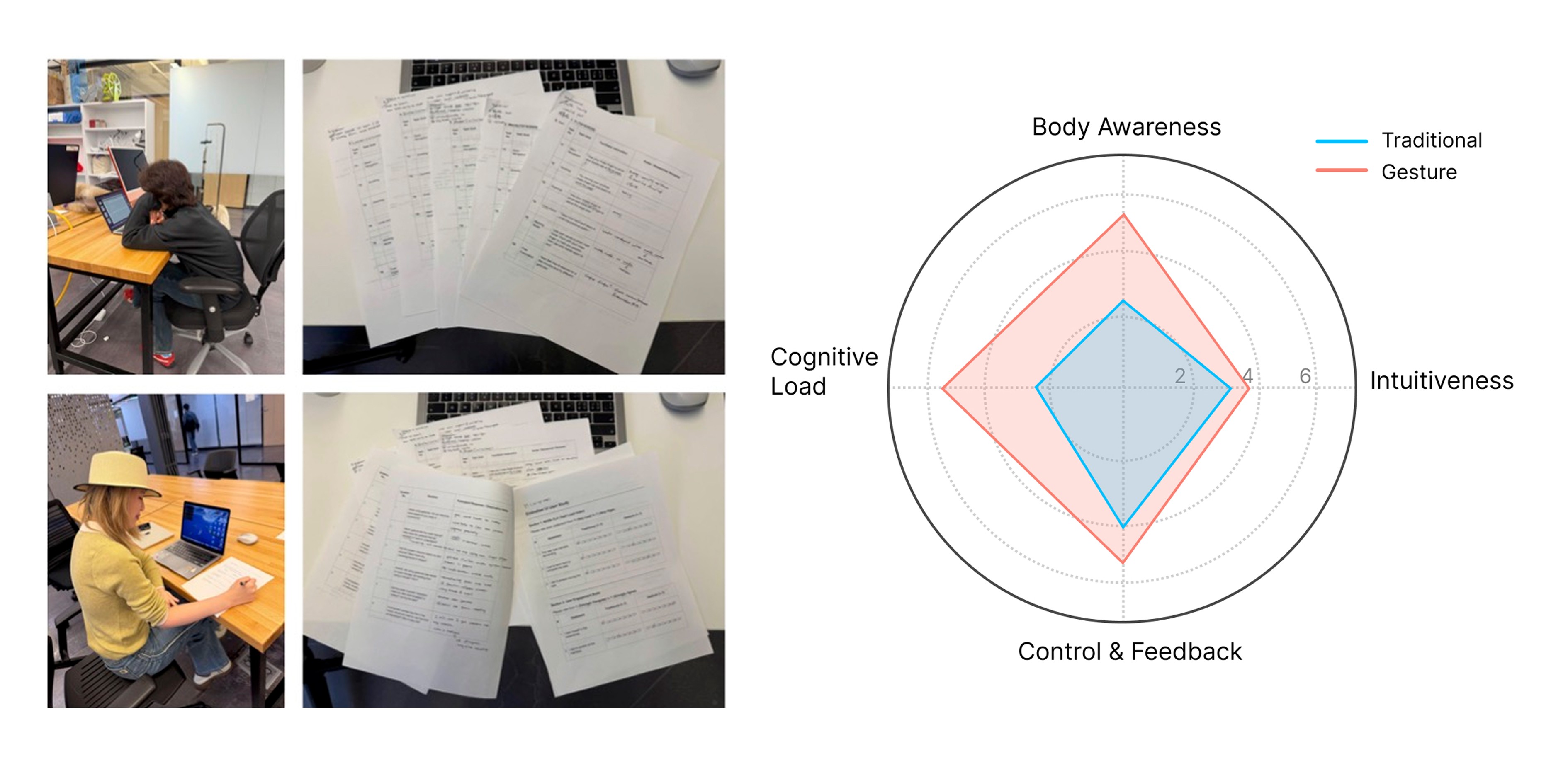
Five participants read with a gesture-controlled PDF, switching between trackpad and gesture mode. Gesture mode woke their bodies up and often felt fun, but it pulled attention straight off the reading. The radar chart made the trade-off unmistakable: more body awareness, higher cognitive load.
Research · Generative
What people build when you hand them the future
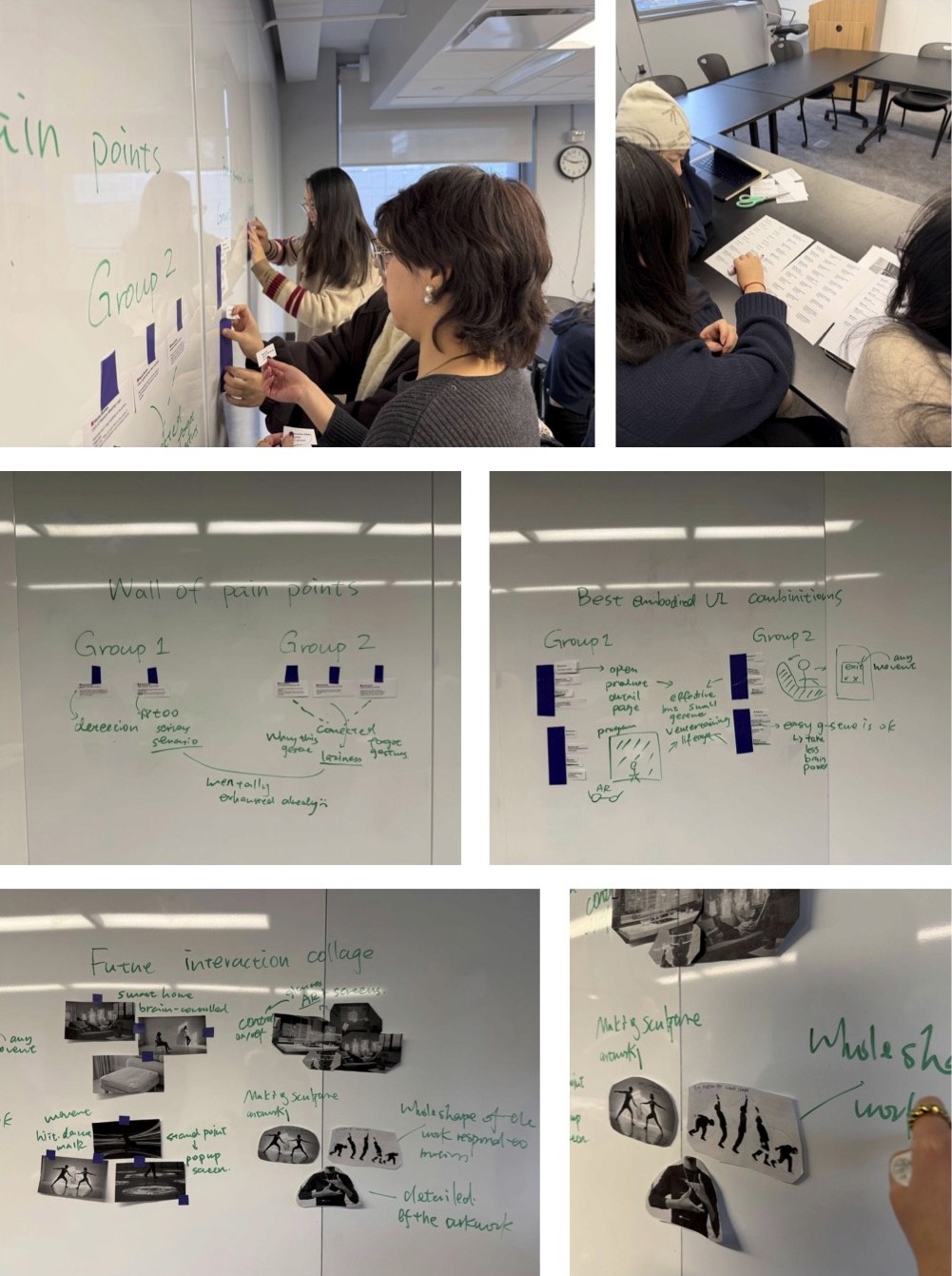
In co-design workshop, people used structured card sets, body parts, gesture types, motion intents, scenarios, to assemble their own ideal interactions. The wall of pain points put mental burden on top: mis-detection anxiety, gesture-meaning mismatch, overload in complex tasks. Their choices stayed consistent. Small gestures for frequent actions, big movements saved for play, almost every scenario set at home.
Put next to the PDF test, three findings shaped everything after.
Gestures work, but compete for attention in focused tasks. Mental burden is the number one barrier. People always want a way back to traditional input. The problem was never gestures. It was context.
Strategy
Design the path, not the destination
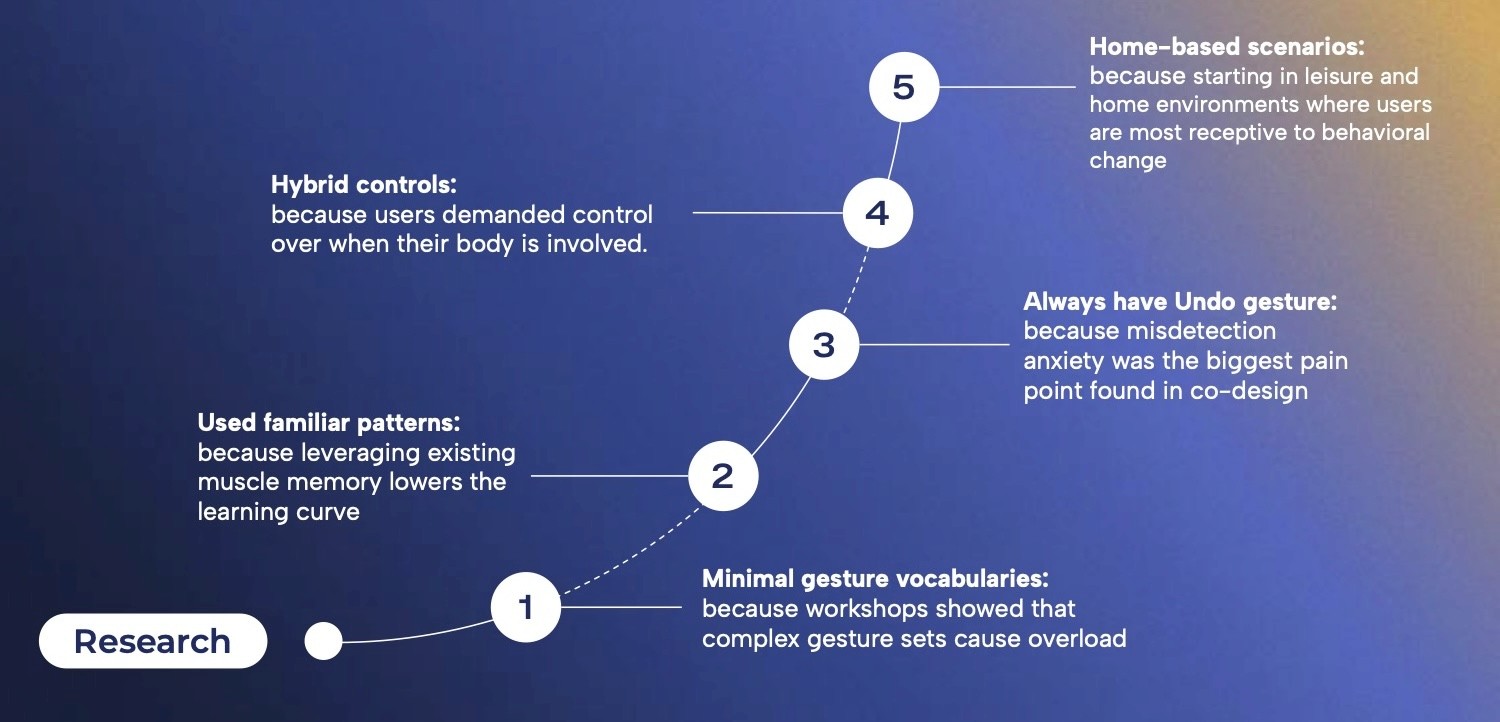
Instead of one hero prototype, I built a collection. Each one bridges a specific adoption barrier using nothing but a webcam, the most accessible spatial tech people already own. Every choice traces back to the research. Three to four gestures per prototype, because complex sets caused overload. Familiar patterns like swipe-up-to-dismiss, to borrow existing muscle memory. An undo gesture in every prototype, to defuse the number one pain point. Hybrid touch and gesture modes, so people decide when their body gets involved. And all of it set at home, in leisure moments, because that's where people are most willing to try something new. That's the strategic doorway.
Prototype 01 · Diagnostic
Gestural PDF Reader
The first prototype was a test, not a solution. Controlling a PDF by webcam, people enjoyed the interaction but couldn't focus on the reading, gesture and content fought over the same attention. It also carried the densest gesture set of anything I built, and in testing people kept mixing up gestures that felt too alike, undo and mark mode especially.
Every gesture is read from MediaPipe's 21 hand landmarks with plain geometry, no trained model, so I made the easily-confused ones physically as distinct as possible: mark mode is a two-handed palm held for a second, undo is a one-handed horizontal wave, nothing they share. A two-second cooldown also stops any gesture from retriggering frame after frame. It earned its place by failing usefully. It proved gesture interaction needs a low-cognitive-load context, not just working tech.

Prototype 02 · Hands-free win
Cooking Copilot
Cooking is the case where gesture control solves a real physical problem. Your hands are wet, oily, covered in dough. Browse recipes by touch, tap Start Cooking, and three gestures take over: swipe to change step, open palm to play or pause, thumbs up to finish. Unlike the PDF reader's hand-coded landmarks, this one only needed common gestures, so I leaned on MediaPipe's pre-trained recognizer and put the work into the flow instead of detection.
A small state machine routes every gesture by the active screen, so the same thumbs up means enter cooking on one screen and finish on the last step. The camera comes on only at that tap, and the moment the tutorial ends I release the stream with getTracks().stop(), so the webcam light actually goes dark instead of quietly staying on. This is the one prototype where a still body was never an option, so gesture stopped competing and started helping.

Prototype 03 · Low load, leisure
Photo Curator
Everyone's phone storage is full, but cleaning up photos on a tiny screen is tedious. Photo Curator moves the job to a big display where you can actually see what you're deleting.
Gestures run the whole thing: swipe up to delete, left and right to move between photos, a heart to favorite, both hands up to undo. The two-handed gestures were the real build challenge, since a heart and two raised open hands look almost the same to a landmark tracker.
I gave them opposite signatures: a heart is two thumbs and two index fingers meeting, undo is both hands raised with fingers spread, so one can never be read as the other. Because deleting is destructive, swipe up sits behind a higher threshold than navigation, so a casual sideways wave never wipes a photo. And a short calibration step reads your hand size up front and scales every threshold to how far you sit from the camera. Low cognitive load, leisure context, home setting, exactly the conditions research said people are most open to.

Prototype 04 / 05
Completing the spectrum
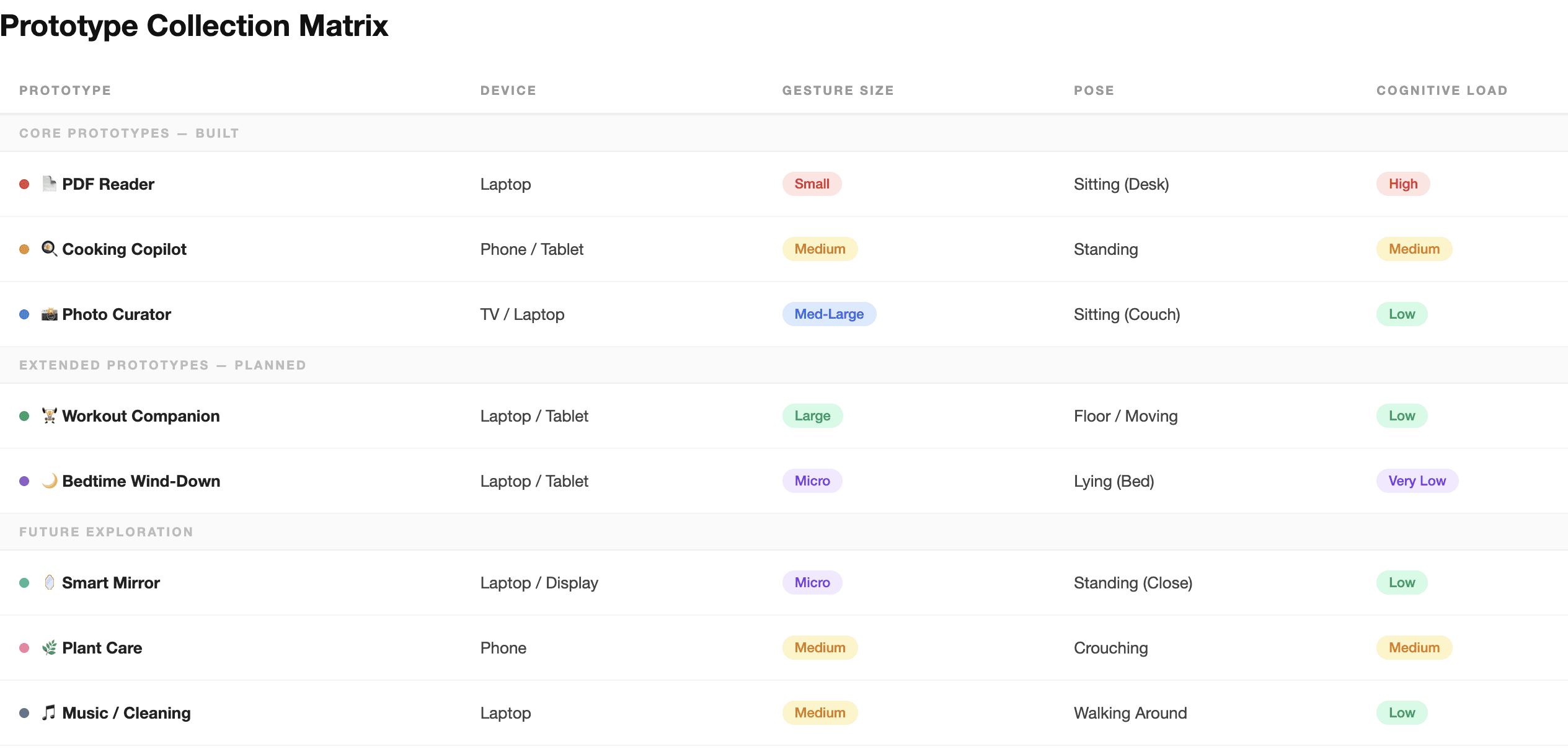
Two more prototypes filled the gaps the map exposed. Workout Companion handles large gestures for a body already in motion. Bedtime uses tiny finger flicks for when you're lying down and barely moving. Together the five span the full range, micro to large gestures, desk to bed, very low to high cognitive load, all of it at home.
Showcase
Strangers, gestures, and a table of rice balls.
I took the strongest prototype and rebuilt it into a finished experience for a public exhibition: Onigiri, a gesture-controlled recipe. This time it had to survive strangers, so it became a real product, a short tutorial that teaches the four gestures before cooking starts, a full ten-step illustrated recipe, a privacy line because the camera feed never leaves the browser, and a keyboard fallback for when detection drops. I also rebuilt the detector as its own event-driven module and fixed the one failure that would have wrecked the experience: the model kept flickering to open palm in the middle of a swipe and pausing the recipe. Pause now waits for twelve steady frames, locks out for a second after any swipe, and only fires once the hand has actually stopped moving.
Then I put it in front of the public. Visitors walked up, hands soon covered in rice, and made onigiri from start to finish with gestures alone, never touching the screen. This was the purest version of the argument: when your hands are full, a screen isn't an option, and gesture becomes the obvious way to interact. Almost everyone got going quickly, but the real lesson was variance. After tuning the thresholds against myself for weeks, I had quietly built the whole thing around one pair of hands, mine.
The crowd broke that. Some people swiped and paused like naturals, others stumbled on the same gesture over and over, and the spread was far wider than my own testing ever showed. Making gesture work for one practiced user and making it work for a hundred strangers are different problems, and the second is never really finished. No one had been briefed and nothing could be explained away, which is exactly why an afternoon taught me more than the lab ever did.

Reflection
What building and showing this taught me
The same lesson kept coming back in every prototype: the gesture model is the easy part, and the reliability around it is the real work. A recognizer can tell you it sees an open palm, but stopping that palm from firing mid-swipe, telling a heart from two raised hands, or keeping a wave from deleting a photo, all of that lives in the layer I had to write by hand.
The worst of it was a single misfire: the model kept flickering to open palm in the last frames of a swipe, pausing the recipe right when someone was moving on. It took three guards stacked together to kill it, twelve steady frames, a lockout after every swipe, and a check that the hand had actually stopped. The exhibition drove the bigger point home: testing on myself had quietly optimized everything for one user, and a room full of strangers showed just how wide the gap is between a system that works for me and one that works for everyone. Designing with code in the loop changed what I researched, because I could test an idea the same day I had it.

Takeaway
Not the endpoint. The path.
The barrier to spatial computing was never the hardware. It was the absence of a path people could actually walk. This collection is one answer, and the exhibition was the proof: strategic context, minimal gestures, familiar patterns, and a way back to touch all held up when real people, not study participants, used them cold. As AI takes over more of what we mean, how we interact is wide open again, and the default of mouse and keyboard is finally up for grabs. The job isn't to imagine where we end up. It's to design the steps that get us there, and then go watch people take them.

